
The network device inventory, read off the devices
The network device inventory reads model, software version, serial number and free ports off every switch, router and firewall, on every collection. Nothing is typed in by hand.
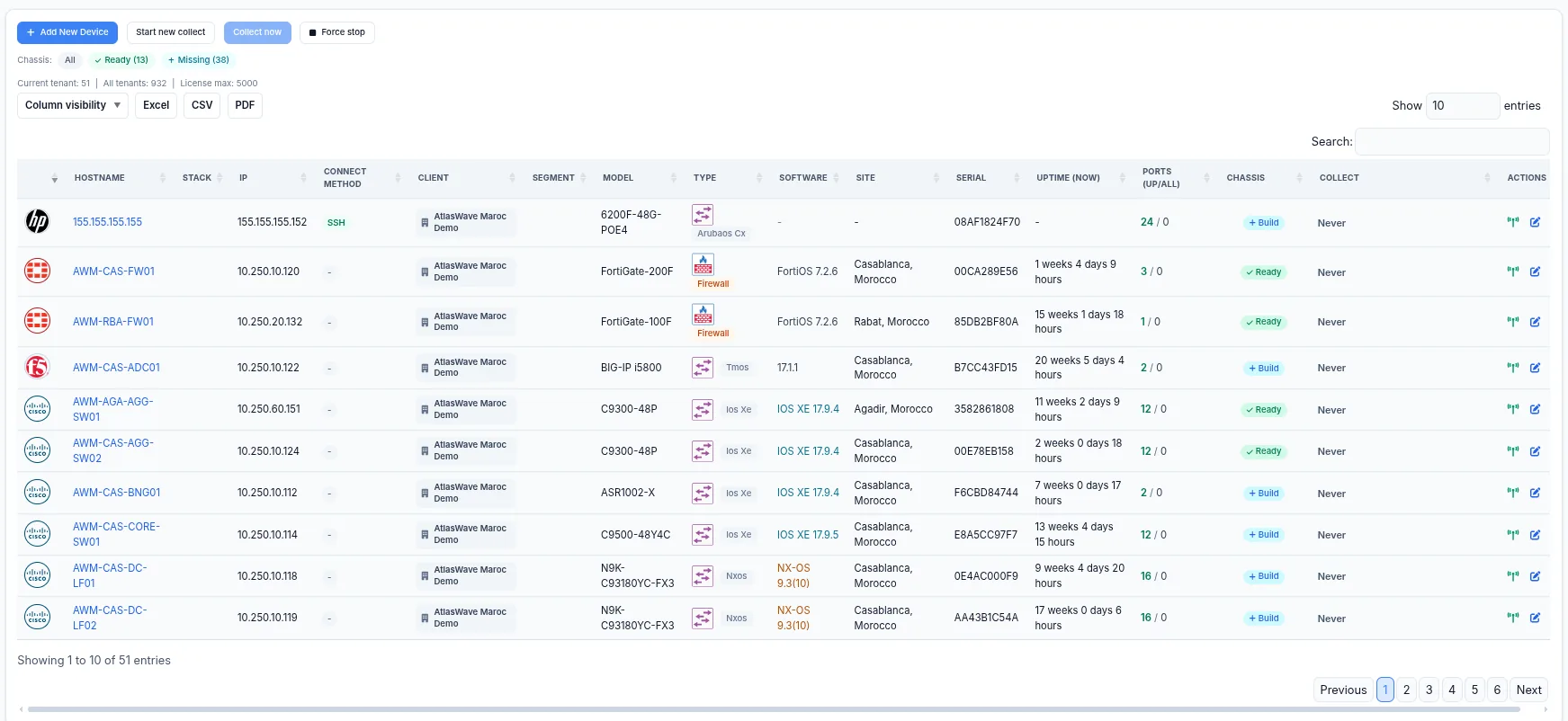
What is captured on each device
Identity
Name, vendor, model, serial number, site, role in the network.
Software
Exact version, which drives both vulnerability exposure and support status.
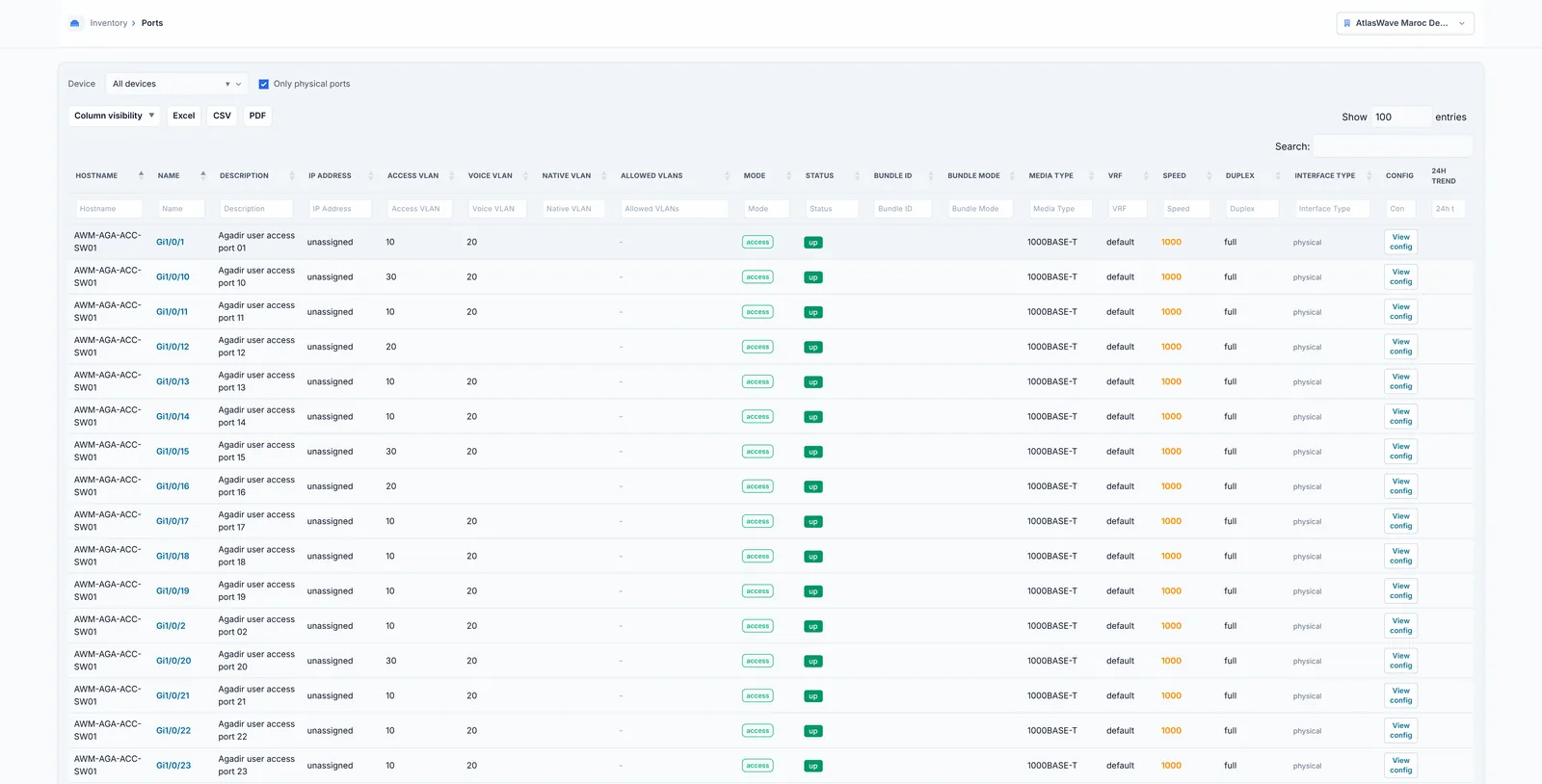
Ports
Used, free, in error, with negotiated speed and configured VLAN.
Addressing
Addresses carried by interfaces, VRF, and the subnets that follow from them.
Endpoints seen
MAC and ARP addresses learned, which is how a machine is found from a single clue.
Configuration
The full text, kept and dated, which makes comparing two dates possible.
What an inventory settles
The questions nobody settles from memory across two hundred devices.
- Which devices the vulnerability published this week reaches. That needs each one's exact model and version.
- Which devices are past vendor support. A chassis at end of support does not fail, it becomes unrepairable.
- How many ports are genuinely free at that site. A figure kept by hand drifts from the ports actually in use.
- Which device carries this serial number, and since when it has been in service.
- Which software versions coexist in production on one model. Rarely fewer than three.
Questions about the inventory
What does the inventory record on each device?
Vendor, device type, model, software version and serial number, refreshed on every successful collection. For each port, the access VLAN, the voice VLAN, the mode, the status, the media type, the VRF, the speed and the duplex. The device page adds stack members and hardware modules. The detail is in the guide recording the serial number and version of every device.
Do you need to install an agent on the devices?
No. NacTrack connects to the devices over SSH, on port 22, with a read account, and sends them each vendor's own display commands. Telnet, on port 23, is used only for a device where you enable it. Nothing is installed on the switches, routers or firewalls. The expected account and the flows are described on the installation page.
Which vendors does the inventory support?
Eight vendors are collected automatically over SSH, among them Cisco (IOS, IOS XE, NX-OS, IOS XR and ASA), Huawei VRP, Aruba AOS-CX, Dell OS10, Fortinet FortiOS and F5 TMOS. Juniper Junos and Palo Alto PAN-OS are read from the configuration you export, with no automatic collection. The vendor matrix gives the coverage platform by platform, gaps included.
What happens to a device that does not answer the collection?
The failure is recorded on the device with its reason, for example password refused, timed out or host unreachable, and with its timestamp. The model, version and serial number already recorded stay in place: only a successful collection rewrites them. The changes, drift and collections report, one of the built-in reports, flags the devices that are unreachable or timed out, and those whose last successful collection is more than seven days old.
How often is the inventory updated?
On every collection, scheduled or started by hand. An answer always comes from the last collection, never from the live device, and the collection date travels with the data. Devices are collected in parallel, eight at a time by default, and the pace is set per schedule. The full cycle is described in how NacTrack works.
Can the ports inventory be exported to Excel?
Yes. The ports index exports all of its rows to Excel or CSV, not just the page on screen, and each device's port list exports the same way. To count the ports genuinely free at a site, see the guide listing the free ports of a switch and of the whole estate.
Related guides
How to find which switch and port a MAC address is on
A user reports a problem and all you have is a MAC address. Search every MAC table at once and get the device, the interface and the VLAN.
How-to guideHow to search with a partial MAC address to find every device from one manufacturer
The first three bytes of a MAC identify the manufacturer. Search on that prefix and MAC Finder becomes an inventory of one vendor's devices.
How-to guideHow to find every port carrying a VLAN
Before you change or retire a VLAN you need to know what actually uses it: every switch it appears on, with the ports assigned to it.
How-to guideHow to see which VLANs a trunk allows
A VLAN reaches a remote site only if every trunk on the way allows it, so the allowed list is the first thing to read when one is missing.
How-to guideHow to tell whether a VLAN still has any ports on a switch
Before removing a VLAN, the answerable question is not whether it is used but whether this switch still has ports assigned to it.
How-to guideHow to find where an IP address lives on the network
Give IP Finder an address and it searches every collected source, ARP tables, inventory and neighbours, then says which device holds it.
How-to guideHow to list the free ports on a switch, and across the fleet
List the free ports of one switch or the whole fleet: port status from every collection, a Capacity report per device, and the vendor commands.
How-to guideHow to record the serial number and version of every network device
Serial number and software version of every network device in one exportable table, plus stack members and modules, and the Cisco commands by hand.
How-to guideHow to read the serial number of a Huawei device
Read the serial number of a Huawei device: display esn, display sn or display elabel depending on the model, with Huawei's documentation cited.
ProductNetwork inventory software
Network inventory software that reads switches, routers and firewalls over SSH, with no agent, on your own server. Multi-vendor, CSV, Excel, PDF exports.
Start by knowing what you have
A one-day read-only audit, and a dated inventory that belongs to you.