
Network inventory software that asks every device itself
NacTrack connects to your switches, routers and firewalls over SSH, with a read account, and records on every collection the model, software version, serial number, ports, addresses, neighbours and configuration. Nothing is installed on the devices, nothing is typed in by hand, and everything stays on your own server.
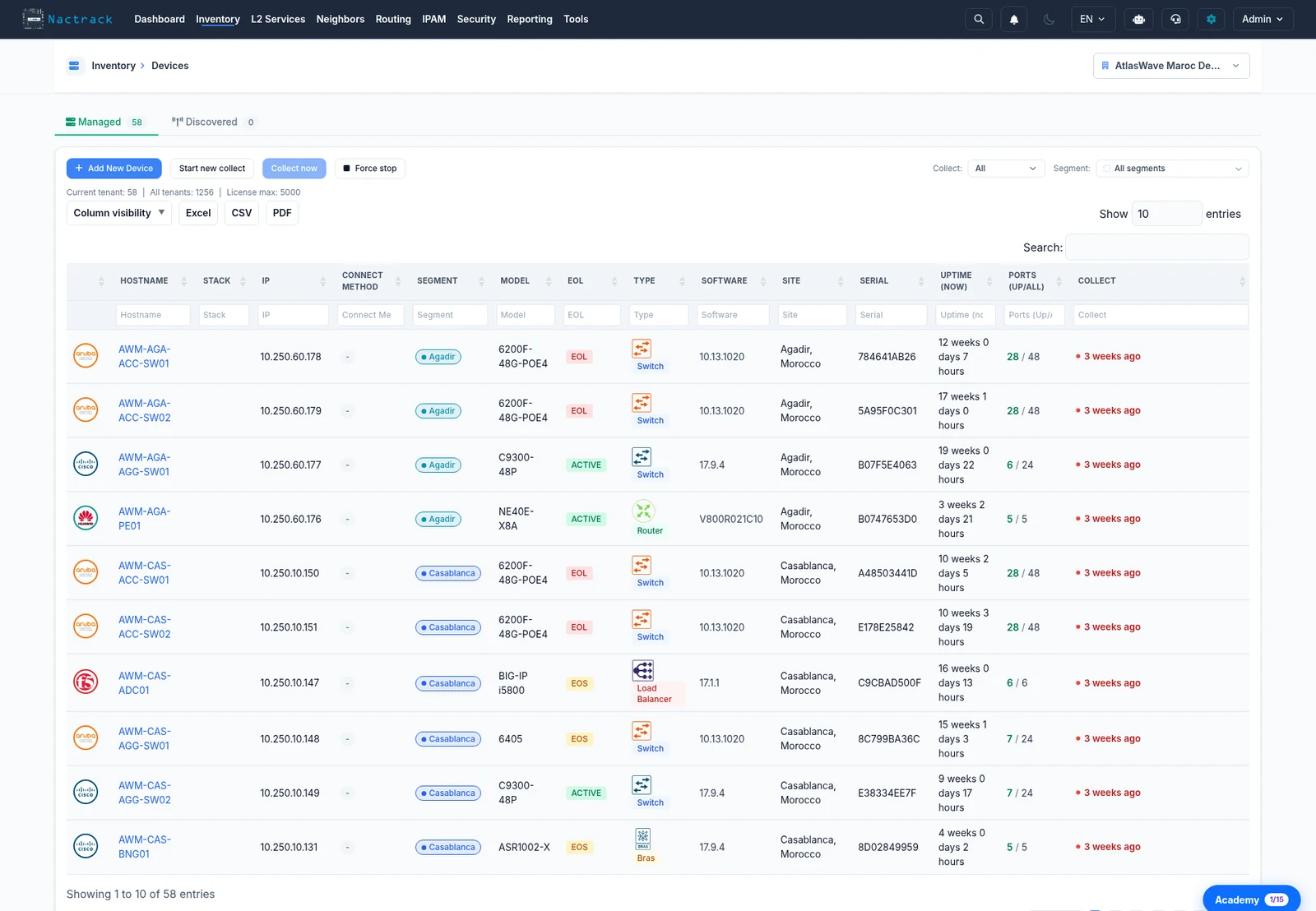
What a network inventory has to hold
Hardware identity
Vendor, device type, model, serial number, with stack members and hardware modules on the device page.
Software version
The exact version, the one that decides CVE exposure and support status.
Ports
For every port, the access VLAN, the voice VLAN, the mode, the status, the media, the VRF, the speed and the duplex.
Addressing
The addresses carried by the interfaces, with their VRF, and the subnets that follow from them.
Endpoints seen
The MAC and ARP tables, which find a machine from a single address.
Configuration
The full text, kept and dated on every collection, comparable between two dates.
The questions to ask network inventory software
And NacTrack's answer to each, including when it is no.
CoveredPartialNot covered
| Question | NacTrack | How |
|---|---|---|
| Agentless? | Covered | SSH on port 22 with a read account, and each vendor's own display commands. Telnet only where you enable it. |
| Safe for the configuration? | Covered | Only show commands are sent, and any prompt that could change the device's state is refused. |
| On-premises? | Covered | An appliance on your machine, physical or virtual: the NacTrack ISO or an Ubuntu VM, 4 vCPUs, 13 GB of memory, 50 GB of disk at least. |
| Multi-vendor? | Partial | Eight vendors collected over SSH: Cisco, Huawei, Aruba, Dell, Fortinet, F5, Infoblox and Forcepoint. Juniper and Palo Alto by configuration import. Arista EOS is not collected. |
| Does it find what nobody declared? | Covered | Discovery follows CDP and LLDP neighbours hop by hop, completed by a sweep of a management address range. |
| Exportable? | Covered | Lists export to CSV, Excel or PDF, filters applied; reports come out as PDF or Excel; a configuration downloads as collected. |
| Open REST API? | Not covered | No open REST API today. A read-only MCP endpoint connects an AI assistant to the inventory. |
An inventory that settles decisions
A device spreadsheet says what someone wrote down one day. An inventory read off the devices says what runs today, with the date of the last collection next to every piece of data.
The same reading feeds the rest: the exact model and version give CVE exposure and end of support, the kept configuration gives the compliance audit and the change history, the neighbours give the topology.
- Updated on every collection, scheduled or manual
- A failed collection recorded with its reason
- Data already recorded stays in place
- The same reading for CVE and end of life
Questions about the network inventory software
Does the data leave our network?
Configurations, credentials and reports stay on your server. Three flows leave by default: the daily licence validation, the CVE and end-of-life catalogue synchronisation, which sends vendor, model or version and device counts, and the automatic error and attack tickets, on until an administrator refuses them. Every flow is described on the what leaves your server page.
How do we try it on our network?
The free trial runs 30 days from activation, on 25 devices, with every module except the AI copilot. You receive a signed installation image built for you, and you check the result against your own collections.
Our device is not on the list. What then?
The vendor matrix gives the coverage platform by platform, gaps included. For a device that is not there, open a ticket: we add the parser free of charge within 5 working days.
Read next
Network device inventory: models, serials, free ports
Models, software versions, serial numbers, used and free ports, across a heterogeneous estate. Collected over SSH, with no agent and no manual entry.
ProductNetwork discovery: find the devices nobody declared
Find and inventory the devices nobody declared, starting from a single entry point and following the neighbours outward, hop by hop.
ProductNacTrack installation and operations
What the installation needs, what it runs, how collection behaves on your devices, and how upgrades and backups work, read from the product.
ProductIPAM software: subnets and addresses read off the network
An IPAM tool that reads addresses off your devices: subnet utilisation, the switch port of an IP, conflicts. Compared with phpIPAM, NetBox, Infoblox.
ProductCisco EOL checker
Check Cisco end of life across the whole estate: every model read off the devices, matched to a catalogue, devices within 180 days, models with no data.
How-to guideHow to record the serial number and version of every network device
Serial number and software version of every network device in one exportable table, plus stack members and modules, and the Cisco commands by hand.
See your estate as it is
30 days on your network, 25 devices, a signed image built for you.