Cisco EOL checker: end-of-life dates for your whole estate
Looking up an end-of-life notice on Cisco's site works for one model. For an estate, you first need to know which exact models run, and how many. NacTrack reads the model off every device, matches it to a lifecycle catalogue, and counts the devices behind each deadline. A model missing from the catalogue is counted as missing data, never guessed.
How the check runs
- 1
The exact model, read off the device
On every collection, over SSH and read-only. The inventory's Model column carries the part number, and the EOL column on the same list the lifecycle state of each device.
- 2
The match against the catalogue
On the exact vendor and model pair, not on a family. The catalogue synchronises every night, and on demand with Sync now.
- 3
The EOL Lifecycle page
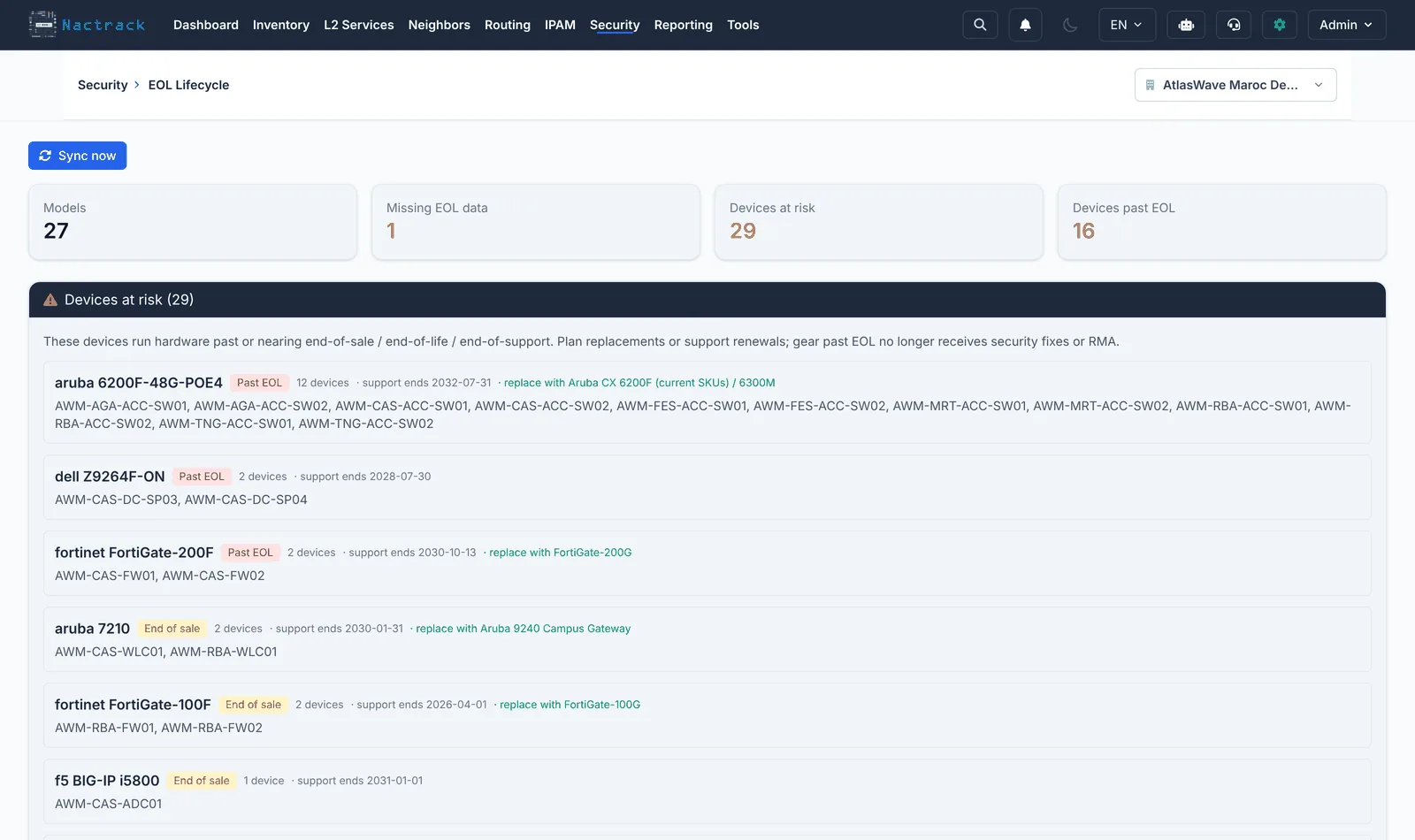
Under Security: the Models, Missing EOL data, Devices at risk and Devices past EOL tiles, then one row per model with the device count, EOS, EOL, end of support, replacement and status.
- 4
The report
The EOL / Lifecycle report in the report catalogue carries the fleet figures, dated: past end of support, past end of sale, at risk within the window, coverage.
Why the exact model matters: the Catalyst 2960
"2960" covers several families, each with its own Cisco notice and dates. Last date of support, from the notices cited in the guide.
| Family | Part number | Last date of support |
|---|---|---|
| Original 2960 | WS-C2960 | 31 October 2019 |
| 2960-S and 2960-SF | WS-C2960S | 30 November 2020 |
| 2960-C | WS-C2960C | 31 October 2025 |
| 2960-Plus | WS-C2960+ | 31 October 2026 |
| 2960-L | WS-C2960L | 31 October 2026 |
| 2960-X and 2960-XR | WS-C2960X, WS-C2960XR | 31 October 2027 |
| 2960-CX | WS-C2960CX | 30 April 2029 |
A model with no date is a result, not a gap to hide
A model missing from the catalogue still appears, highlighted, with a dash in place of its dates, and is counted in Missing EOL data. It drops out of the coverage percentage instead of being counted as healthy.
An end-of-support date is never inferred from another, and a catalogue row for one part number does not cover its siblings. There is no manual date entry on the appliance: a model with no date is reported by ticket.
- At risk: a deadline within 180 days, by default
- The replacement model when known
- The host names of the devices at risk
- Coverage turns to a warning below 80%
Questions about the end-of-life check
Does the check cover Cisco only?
No. It covers every collected platform whose model has an entry in the end-of-life catalogue. A model that has none is shown as missing data, whatever the vendor.
What leaves our network for this check?
The appliance sends our service your estate's vendor and model pairs, with their device counts, and caches the dates that come back: counts per model, never a named device. This synchronisation can be switched off; every flow is detailed on the what leaves your server page.
Can a status announced by the vendor override the dates?
Yes. A status set in the catalogue takes precedence over the computed dates, because a vendor sometimes announces an extension that no published date reflects yet. The five states are described on the end of life and end of support page.
Read next
Network hardware end of life, matched to your estate
The lifecycle of every model in your estate, matched against the real inventory, with the number of devices affected by each deadline.
How-to guideHow to find the end-of-support date of a Cisco Catalyst 2960
Cisco 2960 end-of-support dates by family: 2960-Plus and 2960-L support ended 31 Oct 2026, 2960-X/XR end Oct 2027, 2960-CX 2029. From Cisco's notices.
ManualEOL lifecycle
The end of sale and end of support dates of your models, the devices at risk within 180 days, and how the lifecycle catalogue updates.
ProductNetwork device CVE exposure by exact software version
Which devices a published vulnerability can reach, matched to the exact software version of each one, with its severity and the fixing version.
ProductNetwork inventory software
Network inventory software that reads switches, routers and firewalls over SSH, with no agent, on your own server. Multi-vendor, CSV, Excel, PDF exports.
How many of your Cisco devices are already out of support?
The number, the model and the date, on your own estate.